How Wrong Way Works in Machine Party
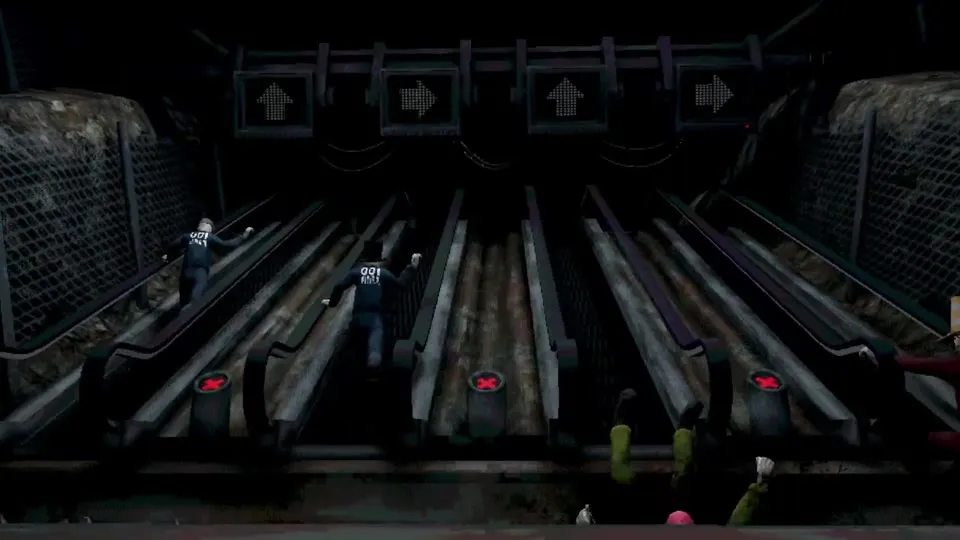
Wrong Way is an exacting reflex, rhythm, and endurance minigame in Machine Party that tests players’ mental processing speed under extreme visual duress. Two to four contestants are placed at the base of four adjacent industrial steel escalators. These escalators move downward at a steady, unforgiving speed, feeding directly into a set of spinning steel pulverizer teeth at the base of the chamber.
To climb upward and maintain distance from the grinder, contestants must input a continuous stream of directional arrow prompts displayed on an overhead electronic feed. Each correct directional keypress propels your character one step up the moving stairway. However, a single incorrect input causes your character to trip, inducing a severe stumble penalty that slides you multiple steps down toward the grinding teeth. The last surviving contestant who avoids being consumed by the base pulverizer claims the round victory.
Core Mechanics & Environmental Parameters
| Escalator Element | Rules & Mechanical In-Game Behaviors |
|---|---|
| Downward Tread Velocity | The escalator continuously moves downward at approximately 1.5 steps per second, accelerating over time. |
| Directional Prompt Stream | Cardinal prompts (Up, Down, Left, Right) scroll vertically down the interface above each player’s lane. |
| Step Progression | Inputting the matching directional command advances your character exactly one step up the stairs. |
| Stumble Penalty | Pressing an incorrect direction triggers an error buzzer, staggering your model backward by 3 steps. |
| The Base Pulverizer | High-torque industrial grinder at the bottom baseline. Touching the lower boundary triggers instant elimination. |
| Victory Condition | Outlast all competitors by maintaining a clean input rhythm until rivals succumb to the grinder. |
Phase-by-Phase Climbing Strategy
Phase 1: Eye Placement & Visual Decoupling
The most common mistake made by new players is looking down at their character model to see where their feet are on the escalator:
- Decouple Your Gaze: Never watch your character. Your character model provides zero actionable data.
- Anchor on the Prompt Feed: Keep your eyes locked strictly on the directional arrow display at the top of your lane.
- Chunking Prompts: Train your visual processing to scan arrows in groups of two or three rather than reading individual symbols. Seeing “Up-Right-Down” as a single rhythmic phrase allows your fingers to execute the sequence smoothly without micro-pauses.
Phase 2: Hardware Input Optimization (D-Pad vs Analog Stick)
Input hardware configuration is decisive in Wrong Way:
- Never Use an Analog Thumbstick: Thumbsticks have spherical potentiometers with rotational deadzones. When you attempt to press Up or Right, an accidental 15-degree angle deviation can register as an unintended diagonal input. The Godot engine rejects diagonal inputs in Wrong Way, counting it as a fatal mistake.
- Use the Digital D-Pad on Gamepads: Always use the digital directional pad (D-Pad) with distinct mechanical micro-switches or tactile membranes.
- Keyboard Arrow Keys: If playing on PC with a keyboard, use dedicated Arrow keys or WASD with clean linear switches. Ensure your keyboard features anti-ghosting so simultaneous presses do not drop inputs.
Phase 3: Building a Controlled Input Cadence
Speed without accuracy is fatal in Wrong Way. The math of the escalator proves why steady rhythm beats frantic spamming:
- One correct step advances you by +1 step.
- The downward tread pulls you backward at -1.5 steps per second.
- One wrong input slides you backward by -3 steps and locks input registration for 0.4 seconds.
- Therefore, a single error wipes out the progress of roughly four flawless steps.
- Maintain a disciplined, metronomic cadence of approximately 2 to 3 inputs per second. You will comfortably outpace the downward movement of the treads while maintaining near-zero error rates.
Phase 4: Recovering from a Stumble
If your finger slips and you trigger a stumble:
- Do Not Mash: Frantically mashing buttons during the stumble animation only queues additional errors, guaranteeing you slide straight into the grinder.
- Take Your Hands Off for 0.3 Seconds: Let your character complete the stumble recovery animation and regain footing.
- Identify the Active Arrow: Look at the current prompt at the bottom of the active queue.
- Re-engage with Single Presses: Execute two deliberate single presses to rebuild your rhythm before accelerating.
Critical Errors to Avoid
| Tactical Error | Fatal Consequence | How to Avoid |
|---|---|---|
| Input Spamming | Frantically pressing buttons without reading prompts creates consecutive stumbles, sliding into the teeth. | Maintain a steady 2-beat cadence; speed up only after mastering input consistency. |
| Using Analog Sticks | Rolling the stick produces accidental diagonal inputs, triggering instant error penalties. | Switch strictly to the controller D-Pad or keyboard arrow keys. |
| Watching Opponents’ Progress | Glancing across lanes breaks your visual rhythm, causing you to misread the next arrow. | Keep your eyes glued to your personal lane prompt column; ignore other lanes completely. |
| Tensing Shoulders and Forearms | Physical muscle tension during long streaks causes finger cramps and twitch misinputs. | Consciously relax your hands and breathe steadily during extended climbing sequences. |
Step-by-Step Guide to Unlocking “Stairmaster” Achievement
The achievement “Stairmaster” is a prestigious 11.1% unlock requiring you to execute 50 correct steps in a row without a single error:
- Clean Run Requirement: You must input 50 consecutive directional arrows with 100% accuracy. A single incorrect input or stumble instantly resets the internal streak counter to zero.
- Set Up a Custom Match: Launch a Custom match with a friend or in Local Couch Co-op (see our How to Play with Friends Guide for connecting gamepads). Avoid competitive online lobbies where other players die early, ending the round before you reach 50 steps.
- The Silent Vocalization Technique: As arrows scroll down your screen, whisper the directions aloud under your breath (“Up, Left, Up, Right, Down”). Engaging both visual and auditory neural pathways dramatically reduces autopilot brain-slip errors.
- Target the Milestone: At an average pace of 2.5 steps per second, achieving 50 steps requires roughly 20 to 22 seconds of unbroken focus.
- Achievement Pop: The moment your 50th consecutive correct step registers in the engine, the achievement notification pops in the corner of your screen.
For additional timing and rhythm-focused minigame guides, explore our breakdowns for Table Manners and Smoke Break. For calibrating input latency and button response times, review our Controls and Gamepad Guide.